Need to quickly make a change to your hearing aids? Want to stop streaming audio or turn down the volume? With a press of a button, the Miracle-Ear MELINK™ Remote makes adjusting your hearing aids simple and discreet. Learn how the MELINK™ Remote can improve the way you hear your world.
There’s a lot to love about the Miracle-Ear MELINK™ Remote. Check out some of its key features.
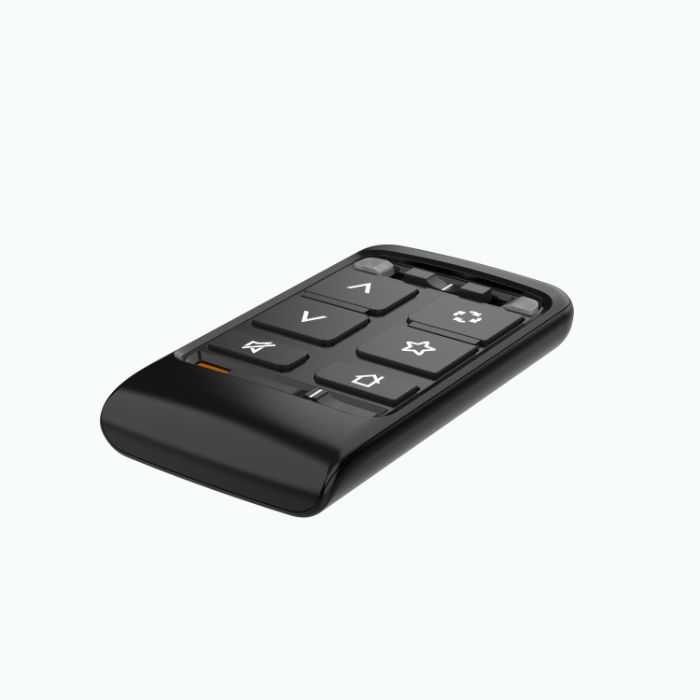
The MELINK™ Remote is designed to be simple and user-friendly, whether you’re changing the volume or adjusting your hearing aid program.
The remote’s straightforward, easy-to-use button design makes adjusting your hearing aids quick and discreet. This remote control for hearing aids features only six buttons: the Ear Selection Switch, Volume Up, Volume Down, Mute/Unmute, Memory Change, Favorite, and Home, plus a switch to Lock or Unlock settings.
The visual cues on the buttons make the remote a quick tool to learn. A lanyard can also be added to hook onto a keychain or ring.
The MELINK™ Remote can be paired to Miracle-EarBLISS™ or Miracle-EarAVAIL™ hearing aids—either single or a pair—with a simple touch of the Home button.
Your remote only needs to be paired to your hearing aids once. After that, your devices will automatically recognize each other when in range, allowing you to seamlessly use your remote control for hearing aids.
The MELINK™ Remote features a Lithium-Ion battery, which gives the device an expected service life of three years. Without the need to recharge or regularly replace the battery, this remote control for hearing aids can be used in any environment without the worry of losing battery power. When the battery has reached the end of its lifecycle, it can be recycled and swapped for a new one at your neighborhood Miracle-Ear location.
With the help of a wireless, 2.24-2.48 GHz connection, your hearing aid remote can be used with your hearing aids without the inconvenience of wires. This allows you to make easy adjustments wherever you are, using its buttons:

Ear Selection Switch
Adjust left or right accordingly

Volume Up/Down
Find the sweet spot for your ears

Mute/Unmute
Turn off all sounds or amplify them

Memory Change
Quickly choose the program you need

Favorite
Customize your remote to your needs

Home
Restore default settings in one click
While the hearing aid remote control can wirelessly transmit signals to your hearing aids, it’s still possible that changes to signals, such as power line disturbances, airport metal detectors, or electromagnetic fields from other medical devices, can occasionally disrupt that connection.
This Miracle-Ear remote control works best with hearing aids in the Miracle-EarBLISS™ or Miracle-EarAVAIL™ lines. Both lines feature a variety of styles and designs, including receiver-in-canal, behind-the-ear, in-the-canal, invisible-in-the-canal, and completely-in-canal hearing aids, allowing you to choose the option that fits your lifestyle and needs.
When selecting your hearing aids, work with your HCP to determine which style will be best for you. Your HCP can also direct you to the hearing aids that are compatible with the MELINK Remote AV and other accessories.
Have questions about your new MELINK™ Remote or need help with troubleshooting? Review the Miracle-Ear user manual to get the technical specs and instructions for your new device. If you still have questions, schedule an appointment at your local Miracle-Ear to discuss how hearing aid accessories can enhance your experience.
Discover the reasons why millions of Americans have trusted Miracle-Ear for hearing care.
*Reviews may be edited for spelling and grammar



 Our licensed experts will help you with any questions you may have

 Find your closest Miracle-Ear center