Friends together at home

Remote

MELINK™ Hearing Aid Remote

The Miracle-Ear MELINK™ Remote provides easy remote control for hearing aids, featuring a user-friendly design and extended battery life.

MELINK™ Remote for remote control of hearing aids

Need to quickly make a change to your hearing aids? Want to stop streaming audio or turn down the volume? With a press of a button, the Miracle-Ear MELINK™ Remote makes adjusting your hearing aids simple and discreet. Learn how the MELINK™ Remote can improve the way you hear your world. 

remote control for hearing aids

MELINK™ Remote characteristics

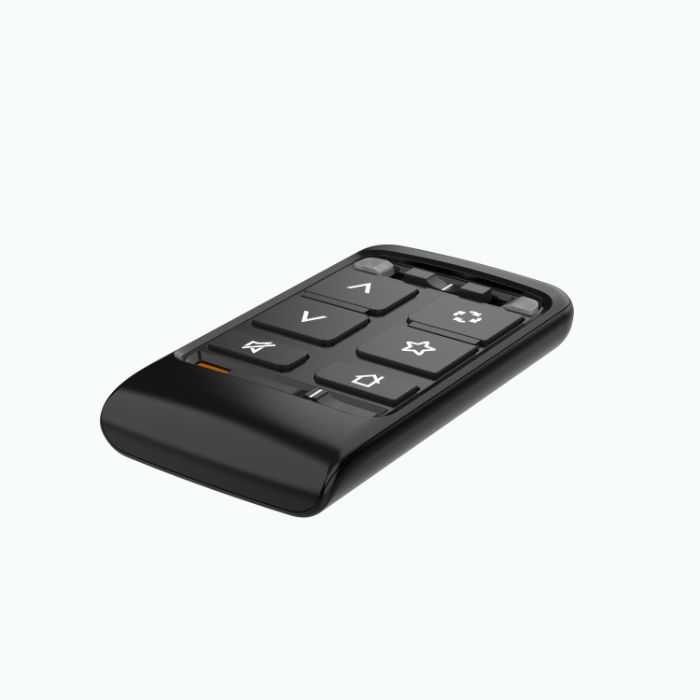
  • The MELINK™ Remote has six buttons that can easily change the volume or program on your hearing aids.
  • The remote can be paired with one hearing aid or two.
  • Use the remote to quickly and discreetly adjust your hearing aids.
  • The remote has a wide connection range to be used at home and in public.

Try it in one of our stores

Key features

There’s a lot to love about the Miracle-Ear MELINK™ Remote. Check out some of its key features.

Easy to use

The MELINK™ Remote is designed to be simple and user-friendly, whether you’re changing the volume or adjusting your hearing aid program.

The remote’s straightforward, easy-to-use button design makes adjusting your hearing aids quick and discreet. This remote control for hearing aids features only six buttons: the Ear Selection Switch, Volume Up, Volume Down, Mute/Unmute, Memory Change, Favorite, and Home, plus a switch to Lock or Unlock settings.

The visual cues on the buttons make the remote a quick tool to learn. A lanyard can also be added to hook onto a keychain or ring.

Easy to set up

The MELINK™ Remote can be paired to Miracle-EarBLISS™ or Miracle-EarAVAIL™  hearing aids—either single or a pair—with a simple touch of the Home button. 

  1. Unlock the remote using the lower switch.
  2. Power off, then power back on your hearing aid/s, and place your devices within 12 inches of the remote. It is necessary to place the devices near each other to be in range and pair correctly.
  3. Press and hold the Home button for five seconds. Blue and red LED lights should start rapidly blinking after five seconds.
  4. If you’re pairing a set of hearing aids, the left blue LED light and the right red LED should become solid after two-plus seconds. If the lights don’t become solid, repeat the previous steps.
  5. If you’re pairing a single hearing aid, the relative LED light (blue for left, red for right) should become solid after two seconds. Repeat the previous steps if the light doesn’t become solid.
  6. Test out your connection by carefully pressing the Volume Up or Volume Down buttons to adjust hearing aid volume.

Your remote only needs to be paired to your hearing aids once. After that, your devices will automatically recognize each other when in range, allowing you to seamlessly use your remote control for hearing aids.

Long life battery

The MELINK™ Remote features a Lithium-Ion battery, which gives the device an expected service life of three years. Without the need to recharge or regularly replace the battery, this remote control for hearing aids can be used in any environment without the worry of losing battery power. When the battery has reached the end of its lifecycle, it can be recycled and swapped for a new one at your neighborhood Miracle-Ear location.

Woman wearing hearing aids

Need help with your hearing aids?

Explore our range of modern hearing devices. We offer comfortable solutions that transform hearing, from nearly invisible designs to robust AI technology.

How it works

With the help of a wireless, 2.24-2.48 GHz connection, your hearing aid remote can be used with your hearing aids without the inconvenience of wires. This allows you to make easy adjustments wherever you are, using its buttons:

Use this buttons

Ear Selection Switch

Ear Selection Switch

Ear Selection Switch

Adjust left or right accordingly

This switch, located at the top of the remote, controls whether adjustments are made to one hearing aid or both. To adjust both, move the switch to the middle. Move the switch to the left or right to adjust accordingly. The Remote will light blue for left or red for left or red for right.
Volume Up/Down

Volume Up/Down

Volume Up/Volume Down

Find the sweet spot for your ears

Indicated by arrows pointing up or down, these two buttons adjust the level of sound coming through your devices. Short presses on either button will adjust the overall level of sound amplified into the ear, and a long press will change the volume of audio streamed into the device.
Mute/Unmute

Mute/Unmute

Mute/Unmute

Turn off all sounds or amplify them

This button, indicated by a silencing noise icon, allows you to quickly and temporarily turn off all sounds amplified through the hearing aid. Simply press the button to mute, and press again to unmute.
Memory Change

Memory Change

Memory Change

Quickly choose the program you need

The Memory Change button, recognizable by a cycle icon, can be used to quickly switch between multiple hearing aid programs or memories. Your hearing care professional (HCP) will set these programs up when you purchase your hearing aids or during follow-up appointments. Pressing the button will allow you to cycle through available memory settings to adapt to different sound environments.
Favorite

Favorite

Favorite

Customize your remote to your needs

Indicated by a star, the Favorites button can be used to quickly change your hearing aids’ memory, sound quality or streaming audio. This button can be configured for: Stop/Start Audio Stream, which changes audio streaming directly into the hearing aids; Comfort Boost, which reduces surrounding noise while optimizing sound quality in loud environments; Jump to Memory 4, which adjusts your hearing aid directly to a specific pre-saved hearing aid memory; and Tinnitus Stimulus On/Off, which can be used to mask tinnitus symptoms.
Home

Home

Home

Restore default settings in one click

This button, which features a house, resets your hearing aids back to memory one or the default volume level with a press of the button

While the hearing aid remote control can wirelessly transmit signals to your hearing aids, it’s still possible that changes to signals, such as power line disturbances, airport metal detectors, or electromagnetic fields from other medical devices, can occasionally disrupt that connection.

Miracle-Ear rechargeable hearing aids

Miracle-Ear hearing aid range

If you have questions about hearing aid filters or you’re looking to find the right fit, schedule an appointment with a licensed HCP at your local Miracle-Ear.

Compatibility

This Miracle-Ear remote control works best with hearing aids in the Miracle-EarBLISS™ or Miracle-EarAVAIL™ lines. Both lines feature a variety of styles and designs, including receiver-in-canal, behind-the-ear, in-the-canal, invisible-in-the-canal, and completely-in-canal hearing aids, allowing you to choose the option that fits your lifestyle and needs.

When selecting your hearing aids, work with your HCP to determine which style will be best for you. Your HCP can also direct you to the hearing aids that are compatible with the MELINK Remote AV and other accessories.

Find your closest Miracle-Ear center

Your store

Resources & downloads

Have questions about your new MELINK™ Remote or need help with troubleshooting? Review the Miracle-Ear user manual to get the technical specs and instructions for your new device. If you still have questions, schedule an appointment at your local Miracle-Ear to discuss how hearing aid accessories can enhance your experience.

Visit us in a Miracle-Ear center for more information

store outside
Find the Miracle Ear store closest to you
We’re here for you wherever you’re at home or traveling with experts at over 1,600 locations nationwide.
Find your nearest store
patient and audiologist inside store
Book a free appointment online
Join the millions of Americans who have trusted Miracle-Ear for hearing care that’s tailored for their needs.
Book an appointment
Audiologist and client inside store
Let our certified experts help you
For generations, we've been pioneering better hearing through our personalized approach to care and continued innovation.
More about our experts
hearing care professional at store

How to buy the MELINK™ Remote

Elevate your hearing experience and see the difference in your conversations when using the MELINK™ Remote. To purchase, schedule an appointment with one of our hearing experts to discuss the best solutions for your hearing needs. Contact us now and take the first step toward clearer, more engaging conversations.

Get support and advice

Book an appointment online

Book now

Take a free online hearing test

Start test

Find a hearing aid center near you

Search now